
As enterprise data security standards tighten around proprietary cloud APIs, LocalAI has emerged as the definitive self-hosted drop-in replacement for OpenAI endpoints. Created by Ettore Di Giacinto, this open-source project boasts over 28,000 GitHub stars by providing absolute data privacy and hardware independence.
Quick Answer: LocalAI (MIT license, release v2.26.0) is a verified tool supporting Linux, Docker, macOS, Windows with 28,600 GitHub stars. It avoids proprietary lock-in while offering transparent source code, predictable RAM/CPU footprint, and flexible self-hosted or local deployment.
LocalAI exposes an API fully compatible with OpenAI specifications across multiple modalities: text completion, speech transcription, text-to-speech, and image synthesis—engineered to run efficiently even on commodity CPUs without dedicated GPU hardware.
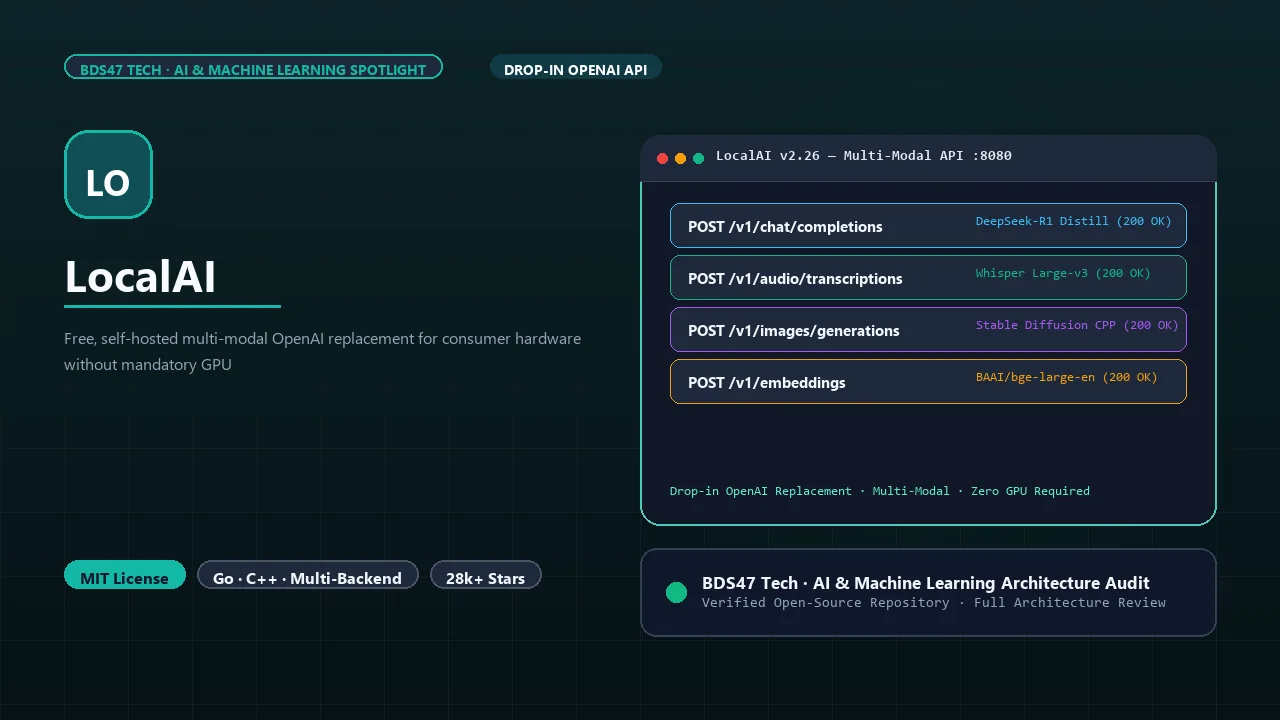
1. System Architecture: A Modular Multi-Backend AI Engine
- llama.cpp & vLLM: Powers high-performance LLM inference across Llama, DeepSeek, and Mistral model families.
- Whisper.cpp & faster-whisper: Handles
/v1/audio/transcriptionswith rapid speech recognition. - Piper & Bark: Serves
/v1/audio/speechfor high-fidelity offline voice synthesis. - Stable Diffusion C++: Powers
/v1/images/generationsfor prompt-to-image creation without Python runtime bloat. - FastEmbed & BERT: Supports
/v1/embeddingsfor enterprise semantic search and RAG indexing.
2. Production Deployment Guide Using Docker
Launch a containerized this software instance across CPU or GPU hardware via Docker:
# CPU-only deployment (Runs on any standard VPS or server)
docker run -p 8080:8080 --name local-ai -ti   -v $PWD/models:/models   localai/localai:latest-cpu

# NVIDIA GPU accelerated deployment
docker run -p 8080:8080 --gpus all --name local-ai -ti   -v $PWD/models:/models   localai/localai:latest-gpu-nvidia-cuda-12
3. Comparative Matrix: LocalAI vs Ollama vs vLLM
| Metric | LocalAI | Ollama | vLLM |
|---|---|---|---|
| Core Purpose | Comprehensive Multi-Modal OpenAI Mirror | Simplified Desktop LLM Runner | Max Throughput LLM Server |
| Audio / TTS / Image Support | Yes (Whisper, Piper, SD) | Text & Vision Only | Text Only |
| CPU-Only Efficiency | Exceptional (Highly Optimized) | Good | Requires Dedicated GPU |
| License | MIT License | MIT License | Apache 2.0 |
4. Advantages & Operational Considerations
Advantages:
- Eliminates code changes for applications built for OpenAI; simply point
OPENAI_BASE_URLto your server. - Single binary or containerized deployment with zero cloud dependencies, enabling 100% air-gapped compliance.
- P2P model distribution simplifies weight synchronization across internal server clusters.
Considerations:
- Advanced YAML configuration requires familiarity with model template files and context arguments.
5. BDS47 Tech Editorial Verdict
this tool provides organizations with a robust, versatile, and hardware-agnostic solution for replacing third-party API dependencies while preserving complete operational privacy.
BDS47 Tech Score: 9.4 / 10 — The most versatile multi-modal OpenAI replacement.
Official Resources & Related Open-Source Tools
- Official Project Website: Official project homepage and documentation.
- Source Code & Releases: Official upstream GitHub repository.
- Category Directory: Explore related utilities inside the AI & Machine Learning open-source catalog.
- Related Software Reviews: Compare with our in-depth Ollama technical review and in-depth Open WebUI technical review.
- Practical Engineering Guide: Read our technical web architecture and AI guide.


